
Karnataka’s Special Intensive Revision (SIR) Voter verification requires linking your 2025 rolls to your 2002 records. Here’s how you can fill the forms and register.
Karnataka’s Special Intensive Revision (SIR) for Karnataka Voters
If you are a voter in Karnataka, navigating the Special Intensive Revision (SIR) and voter enumeration process can feel a bit overwhelming. Based on the insightful guide from Citizen Matters, this post breaks down the entire process into simple, easy-to-understand points so you can complete your enumeration without any hassle.
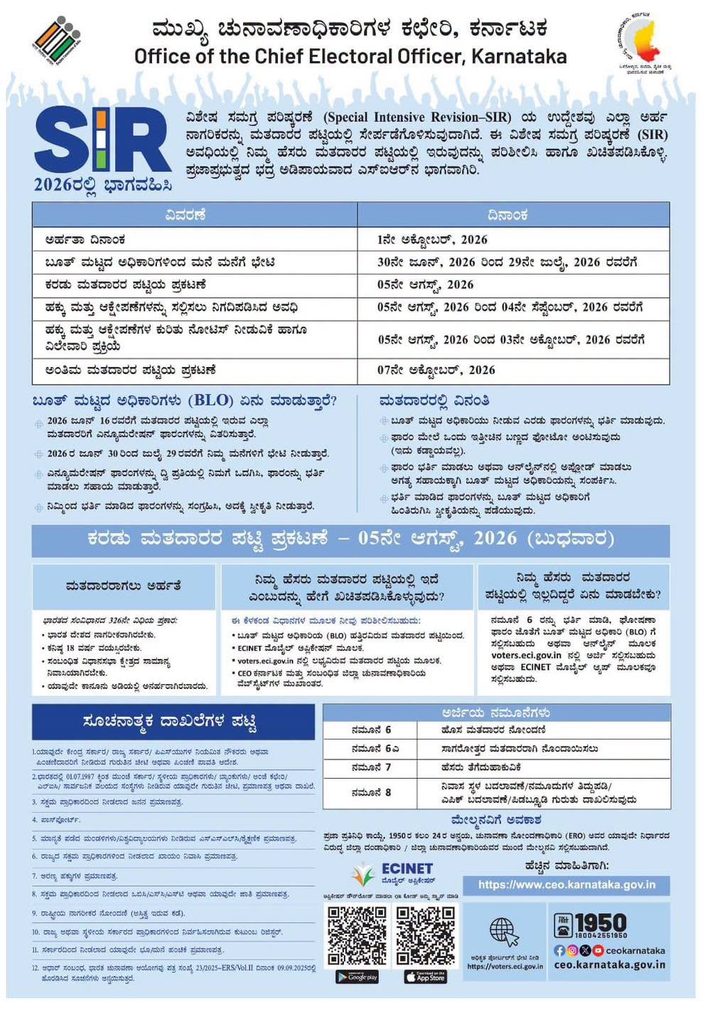
What is SIR and Why is it Happening?
The Election Commission of India (ECI) carries out the SIR to check and clean up voter lists.
- The Goal: To make sure that every single eligible voter is on the list, and no fake, dead, or duplicate voters (like people registered in multiple places) are included. The main motto is: “No eligible citizen is left out, and no ineligible citizen is included.”
What is the Difference Between SSR and SIR?
- SSR (Special Summary Revision): This happens every year. You only need to take part if you want to add your name, change your details, or delete something.
- SIR (Special Intensive Revision): This is different! Every single voter must participate so the entire voter list can be re-verified from scratch.
Step-by-Step Guide to the SIR Process
Based on Citizen Matters‘ series on SIR in Karnataka, here is how you can navigate the process easily:
- 1. Check Your Details Online: Visit the official ECI or CEO Karnataka website to look up your voter details using your EPIC (Voter ID) number.
- 2. Self-Mapping (Section 1): If your name was already on the voter list back in 2002, fill out Section 1. You will need to enter your old details (name, EPIC number, relative’s name, district, assembly constituency, part number, and serial number) exactly as they were in 2002.
- 3. Progeny Mapping (Section 2): If you were too young or not on the voter list in 2002, use Section 2. This means you link your details using the 2002 voter records of a close family member (like a parent or grandparent).
- 4. Fill Personal Details (Section 3): Provide your current personal information, such as your date of birth, mobile number, and parents’ names.
- 5. Submitting Your Form: Submit your form online through the official portal using the OTP sent to your phone. If you face any issues, you can visit your local Booth Level Officer (BLO) or Voter Facilitation Centre for direct help.
What is the SIR Enumeration Process?
The Special Intensive Revision (SIR) is an administrative exercise by the Election Commission of India (ECI) to update and clean up electoral rolls. As part of this, voters are required to fill out an Enumeration Form to verify their details and link their records with past electoral data (such as the 2002 SIR roll).
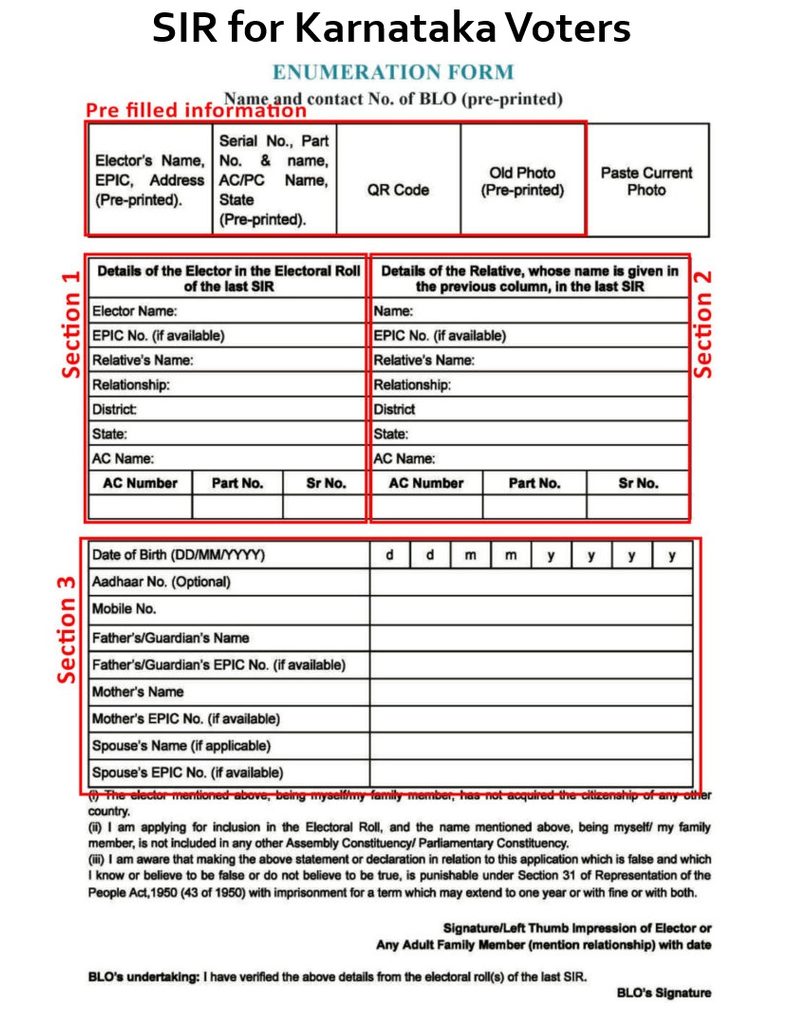
Filling the enumeration form: A step-by-step guide
An Enumeration Form (EF) is used to fill out the details of voters, which will be used to verify if they are eligible.
Here are the steps to submit your enumeration form:
- Your Booth Level Officer (BLO) will bring two copies of your partially filled Enumeration Form to your home.
- You can either fill the physical form, which the BLO will collect during their subsequent visit, OR
- You can fill the Enumeration Form online, by visiting the ECI page.
- The following details will be pre-filled in the form: elector’s name, EPIC number, address, serial number, part number, AC/PC name, old photo, and a QR code.
Some Frequently Asked Questions (FAQs)
- Should we attach any supporting documents while submitting the form?
You do not have to attach any documents during submission of the Enumeration Form. However, after the publication of the draft electoral roll, if the ERO or AERO doubts your eligibility and issues notice, you will have to provide supporting documents.
- What to do if I am not in the city to fill the Enumeration Form?
In that case, any adult from the family can fill your SIR details on your behalf. If the entire family is not in the city, the Enumeration Form can be filled online.
Important Tips for Voters
- No Immediate Document Uploads Needed: You do not need to attach bulky supporting documents when submitting your initial online enumeration form. Documents are typically requested later only if the Electoral Registration Officer (ERO) issues a notice due to a mismatch or doubt.
- Save Your Acknowledgment: Always save the reference number or acknowledgement receipt after successfully submitting your application online to track its status.
- Rely Only on Official Channels: Always use official government portals (
voters.eci.gov.inor the CEO Karnataka website) and avoid clicking on unverified links or forwarding third-party forms.
SIR for Karnataka Voters: Download forms pdf
Citizen Forms
- Form 6 – Application for inclusion of name in electoral roll (Kannada) (PDF, 3.09 MB) (English) (PDF, 675.3 KB)
- Form 6A – Application for Inclusion of Name in Electoral Roll by an Overseas Elector (NRI) (Kannada) (PDF, 109.05 KB) (English) (PDF, 1.28 MB)
- Form 7 – Application for objection to inclusion of name in electoral roll (Kannada) (PDF, 1.63 MB) (English) (PDF, 521.98 KB)
- Form 8 – Application Form for shifting of Residence/Correction of Entries in Existing Electoral Roll/Replacement of EPIC/Marking of PwD (Kannada) (PDF, 2.62 MB) (English) (PDF, 552.09 KB)
- Declaration form Kannada (PDF, 2.08 MB) English (PDF, 471.44 KB)
Teachers’ & Graduates’
- Form 18 – Application for Inclusion of Name in Electoral Rolls for a Graduates’ Constituency (Kannada) (PDF, 644.97 KB) (English) (PDF, 911.68 KB)
- Form 19 – Application for Inclusion of Name in Electoral Rolls for a Teachers’ Constituency (Kannada) (PDF, 677.96 KB) (English) (PDF, 906.93 KB)
- Certificate of Head of Institution of an Educational Institution (Annexure-2) (PDF, 165.56 KB)
- Certificate issued to a Graduate employee by the Gazetted head of office regarding his educational qualification (Third Schedule) (PDF, 224.71 KB)
Service Voters
- Form 2 – For Armed Forces (Army, Navy and Airforce) (English) (PDF, 857.17 KB) (Hindi) (PDF, 320.61 KB)
- Form 2A – For Armed police force of a State, Who is Serving outside that State (English) (PDF, 847.69 KB) (Hindi) (PDF, 497.61 KB)
- Form 3 – For Government of India in a Post outside India (English) (PDF, 914.78 KB) (Hindi) (PDF, 495.62 KB)
Got questions or need help navigating your voter registration? Drop a comment below or reach out to your local BLO!